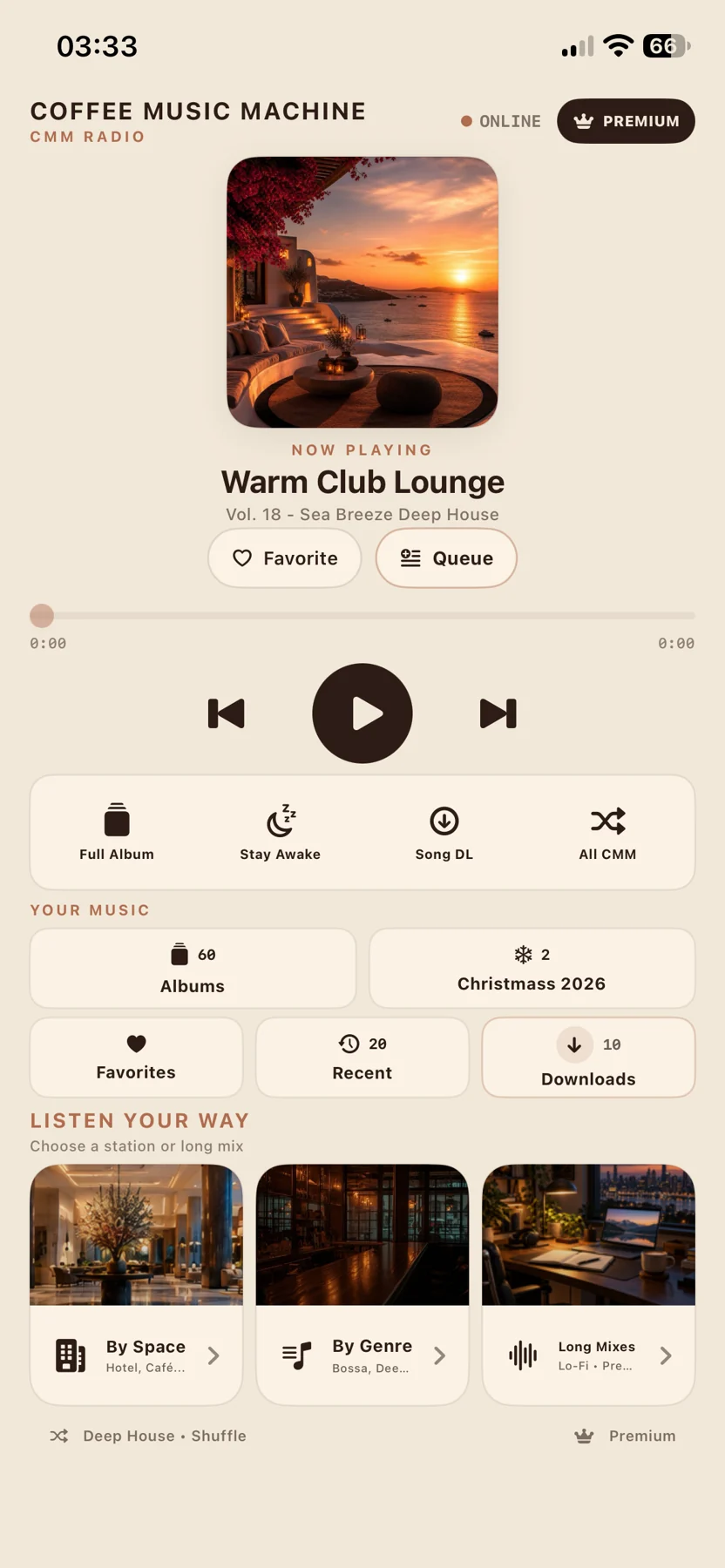
Start or stop playback from the large central button.
01 / INTRODUCTION
Getting started
Coffee Music Machine Radio brings the CMM catalog to your iPhone. Start listening from the main player, open an album, or choose music organized by location and musical style. Certain controls require Premium.
At a glance
- Now Playing shows artwork, track title and album.
- ONLINE is the connectivity status displayed by the app.
- PREMIUM opens your premium controls and account options.
- Your Music opens albums, favorites, recent tracks and downloads.
- Listen Your Way offers stations by space, genre or long mix.
Quick startTap the large Play button to listen. To pick a particular sound, open By Space or By Genre and select a station.
02 / PLAYBACK
Music player controls
The central player stays available when you return from the music library. The controls work with individual tracks and with extended mixes.
Move backward or forward in the current listening sequence.
See elapsed time and total duration; drag the position handle to seek.
Read the active title and its album or mix collection.
Depending on the current mode, an additional label such as TRACK 1 OF 10 or LONG MIX 1 OF 13 appears above the progress bar.
03 / NEXT UP
Build a Play Next queue
Use Queue below the current track to see the songs waiting to play. The number beside the button tells you how many tracks are queued.
- 01Add a trackIn an album, Favorites or Recently Played, tap the circular + button next to the track.
- 02Open the queueTap Queue on the main player to see the Play Next list.
- 03Remove or clearTap × on a specific row to remove it, or Clear Queue to empty the list.
- 04Return to listeningTap Done to close the queue.
04 / DISCOGRAPHY
Albums and full-album listening
Tap Albums in Your Music to browse the available volume covers and titles. Choose a volume to open its track list.
Play the complete album in its track order.
Save the album tracks for offline use when the control is available.
Select an individual track to hear it.
Add an individual track to Play Next.
05 / QUICK CONTROLS
Listening modes and quick actions
Below the transport controls, a row of four quick actions changes according to the active listening mode.
Use the album or mix collection controls. A dark background marks the active selection.
Keep the iPhone display awake while the app remains in the foreground. Tap again to disable.
Control song downloading. Check the Downloads library to confirm saved files and current download status.
Switch to a shuffled selection across the CMM catalog. The bottom status line reads “All CMM · Shuffle.”
ImportantThe highlighted Song DL control alone does not establish that every song is available offline. Verify individual files in Downloads.
06 / YOUR MUSIC
Favorites and listening history
Favorites
Tap the heart-shaped Favorite control on the player to save a song. Open Favorites to see saved titles. In the Favorites list, use the crossed-out heart to remove an entry or + to add it to Play Next.
Recently Played
Open Recent to revisit music previously played. The newest titles appear at the top, and each row includes a + queue control.
The numeric badges shown on the main screen represent the current collection counts; they can change during use.
07 / OFFLINE
Downloads and offline listening
Open Downloads from Your Music or the Premium controls. The Offline Library groups downloaded tracks by album and shows the device's saved-track count and storage usage.
- 01Download musicUse Song DL or Download Album where available.
- 02Find saved tracksOpen Downloads. A saved track displays OFFLINE under its title.
- 03Play offlineTap Play next to a saved track; no active internet connection is needed for that local file.
- 04Use Wi-Fi OnlyTurn Wi-Fi Only on to make pending downloads wait for Wi-Fi rather than using cellular data.
- 05Manage storageReview the total space used, or select Delete All Downloads to remove downloaded music.
The captured screen shows 10 downloaded tracks using 109.4 MB and a maximum download concurrency of 3. Storage amounts depend on the saved files.
08 / STATIONS
Choose music By Space
By Space groups music around the kind of environment you want to create. Each station uses a photographic card. Selecting a station returns to the player and starts its shuffled selection.
How to confirm the selectionThe By Space card shows a highlighted border with a check mark, and the bottom player status displays the selected station—for example, “Hotel Lobby · Shuffle.”
09 / STATIONS
Choose music By Genre
Prefer a particular style? Open By Genre, scroll through the photographic cards and select a genre. The player returns with the selected shuffled station active.
10 / EXTENDED LISTENING
Lo-Fi Long Mixes
Long Mixes are extended listening sessions. Tap Long Mixes from the main screen, then tap the small play symbol on the mix card to start listening.
While a mix is playing
The player labels the active mix and its position in the collection, such as LONG MIX 1 OF 13. The first quick-action button changes to Mixes.
In the capture, Deep Focus has a duration of 125:12, or 2 hours, 5 minutes and 12 seconds.
Scheduled releases
Two disabled mix cards in the screenshots announce Cozy Vinyl for October 21, 2026 and Dark Ambient for October 28, 2026. These dates describe the pictured app state and may change with future updates.
11 / SEASONAL
Christmas Special 2026
Open Christmas 2026 from Your Music to see the special two-album seasonal collection, which is separate from the numbered CMM series.
The Christmas Feeling 2026 · Vol. 125 tracks · Available November 30, 2026
The Christmas Feeling 2026 · Vol. 225 tracks · Available December 7, 2026
Until each release unlocks, its cover is dimmed and marked with a lock icon. The pictured unlock time is 00:00 in the Europe/Bucharest time zone.
13 / SUPPORT
Help & frequently asked questions
How do I play a full album in track order?
Open Albums, select the album you want and tap Full Album. The active album position is shown on the main player.
Where are the songs I saved for offline listening?
Open Downloads under Your Music. Albums and tracks with the OFFLINE label are stored locally on the device.
How do I avoid using cellular data for downloads?
Turn on Wi-Fi Only in Downloads or Premium. Pending downloads will wait for a Wi-Fi connection.
How can I remove songs from Play Next?
Open Queue, tap × on a song, or choose Clear Queue to remove the entire queue.
Can I return to a song I listened to earlier?
Yes. Open Recent to view Recently Played and select the track.
Why is a Christmas album or a Long Mix locked?
The collection may have a scheduled unlock date. Locked future releases are displayed before they are playable.
My Premium controls are missing. What should I do?
Open Premium and select Restore Purchases. Make sure your Apple account is the one associated with your purchase, and that the device has a working network connection.
How can I stop my screen from locking while I listen?
Turn on Stay Awake. Its button becomes highlighted when active. You can tap it again to turn it off.
Where can I listen in a browser?
Open Coffee Music Machine Web Radio. The browser experience can differ from the iPhone app.
Ready to listen?
Return to the app, browse the catalog or try a station.